Eugene Burke
Jul 16, 2026

Most parish music coordinators spend the majority of their time buried in the thankless task of, well… coordinating all of the moving parts of their liturgy and music program. All of the people, music scores, music licenses, schedules, liturgies, and more need to be managed and coordinated day by day and week by week throughout the year. For most of us, this is a highly manual and seemingly never-ending task.
That’s one of the reasons why we created the Source & Summit Digital Platform: to take the constant work of parish music leaders like you and make it easier, more streamlined, and automated. The real value isn’t only in the time it saves you, it also lies in what that reclaimed time makes possible. Instead of constantly managing every moving part, music coordinators can spend their time building and training choirs, singing, practicing, teaching, and leading music in the liturgy.
But how does it actually work, and how does it actually help? Let’s dive in.
Step 1: Set Up Your Team
On the main Source & Summit dashboard that you’ll see when you first log in, you will find three quick navigation links in the left panel:
Home, where you access all of your Ordos
Templates, where you can automate your preparation process
and Team, where you can manage your account Administrators, Editors, your Choir Members, and your Groups
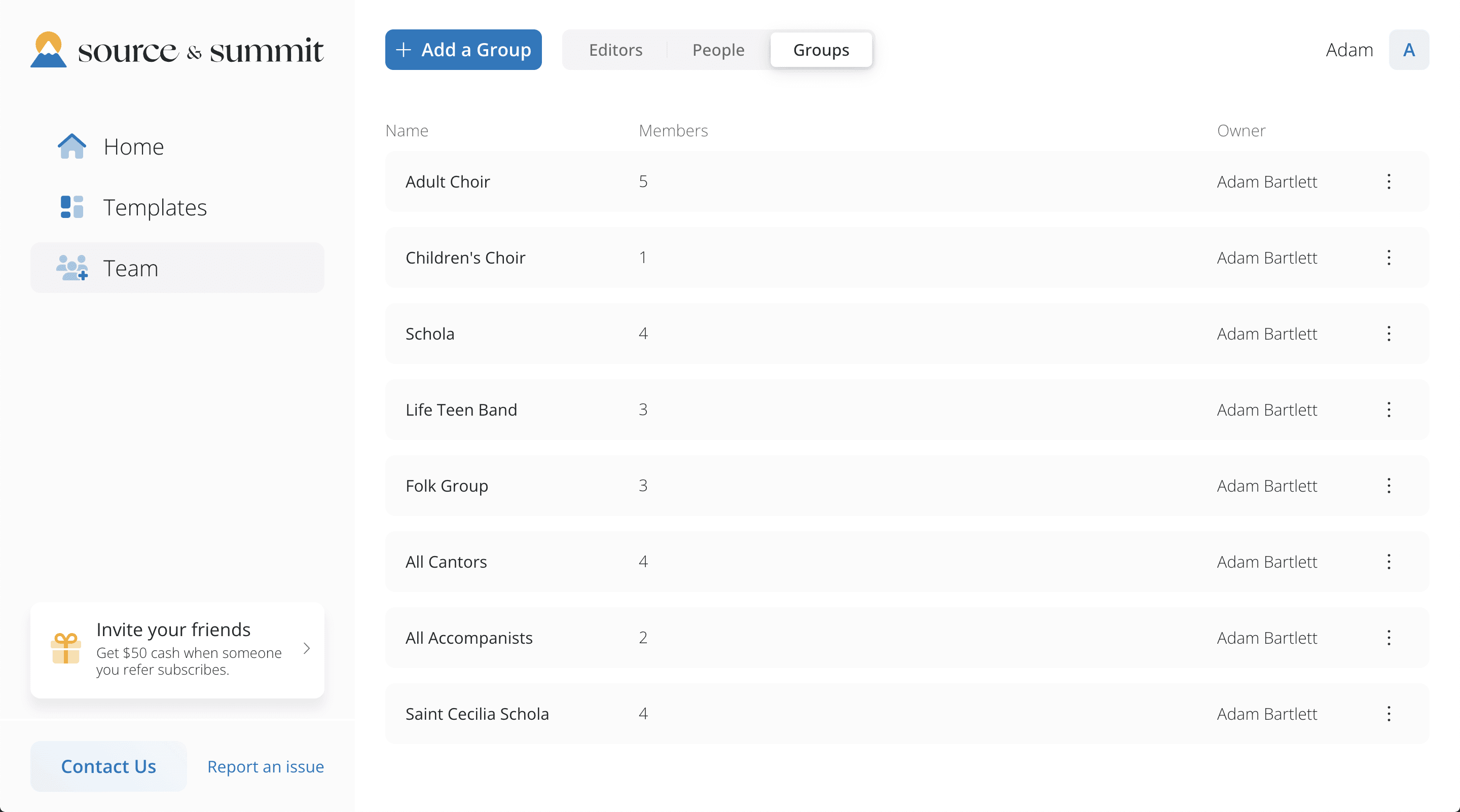
Team Management Dashboard, showing Custom Groups
On a Standard Plan, you can have up to five Admins or Editors, and as many People and Groups as you'd like. People can be added quickly and edited and managed easily. You can also add anyone to a specific Group.
Note that only Admins, who will manage your account, and Editors, who can create and edit Ordos, need to have Source & Summit logins. Everyone else — including Cantors, Choir Members, Accompanists, and even members of the Congregation — can receive what they need without a username or password. You can learn more about Roles in our Help Center
Step 2: Share Ordos with Your Team
After you have set up your team, you can create or open an Ordo and click Share to share it with anyone on your team, or with one of your Groups.
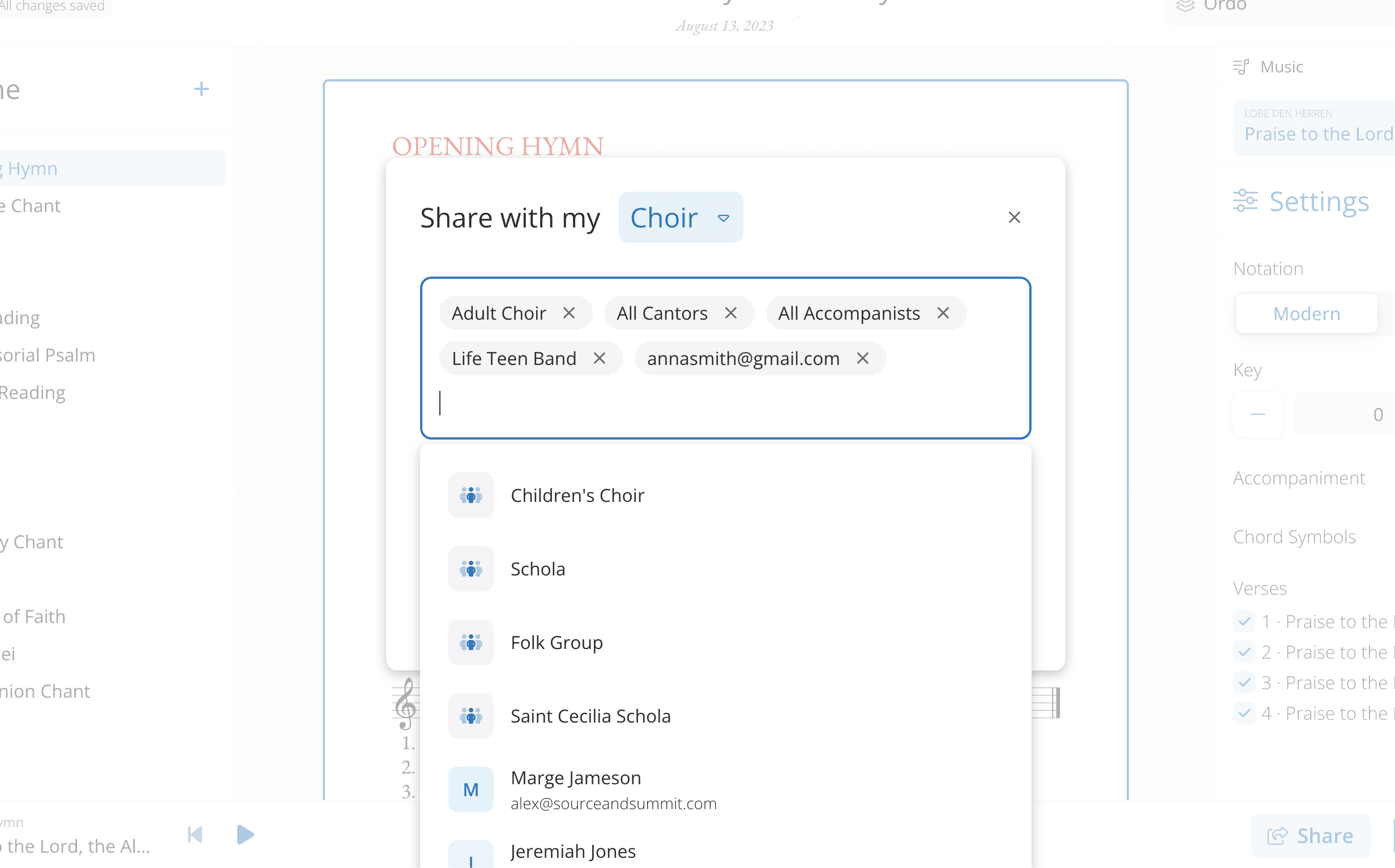
Share with People and Groups
All team and Group members that you shared the Ordo with will receive an email with a link to the Ordo which they view in a browser, or on a mobile or tablet device. Reminder: they won’t need a Source & Summit account to view the Ordo.
Step 3: Your Team Reads, Listens, and Practices
By following the link each team member can view the Ordo by their Role and see all of the content optimized and formatted for their need with one click. They can also download individual scores, or an entire music packet ready for print or use on a tablet device with a single click.
Furthermore, team members can listen to and learn their parts with dynamic MIDI playback.
Here’s how it works.
All of the music in the Source & Summit library is audio-enabled — any piece marked with a small music or speaker icon comes with built-in playback. That playback takes two forms: MIDI keyboard playback, which follows the notation and adjusts automatically when you change the key (a real help for a singer learning a part in a different key), and recorded audio, which lets singers hear the proper vocal style and rhythm before they ever get to rehearsal.
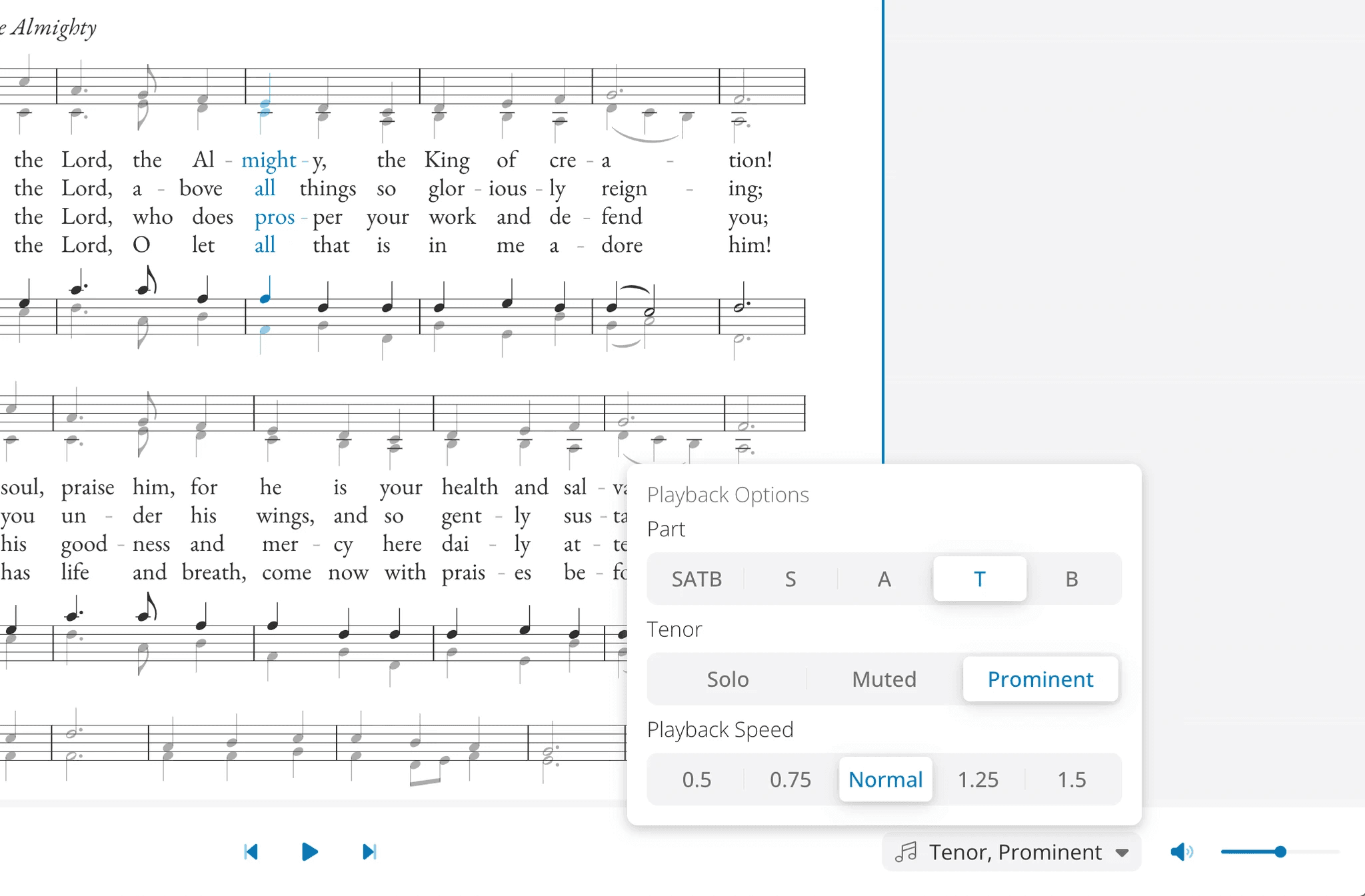
View music and listen to specific parts
For choirs, individual members can use the part isolation tool to customize the audio playback and help them learn their parts. Users can hear any individual part (Soprano, Alto, Tenor, or Bass) on its own, or played prominently within the full SATB arrangement. They can even mute a part or simply listen to all parts together.
Best of all, you don't have to prepare or send any of it separately. When you add an audio-enabled piece to an Ordo and share it with your team, the audio travels with it automatically.
If you decide to upload music from outside the Source & Summit library then you also have the option to upload recordings (or link to recordings) to accompany it, including MIDI files of your own. We’ll explain that in more detail below.
All of these features allow your musicians to arrive at rehearsal already familiar with the music, so your time together can be spent polishing rather than teaching parts note by note.
Step 4: Share with Your Parish Staff or Congregation
The Share feature in Source & Summit also allows you to share Ordos with people outside your music program, such as other parish staff members or even with your whole congregation. To share optimized Ordos with your congregation, click Share and then select Share with my Parish.
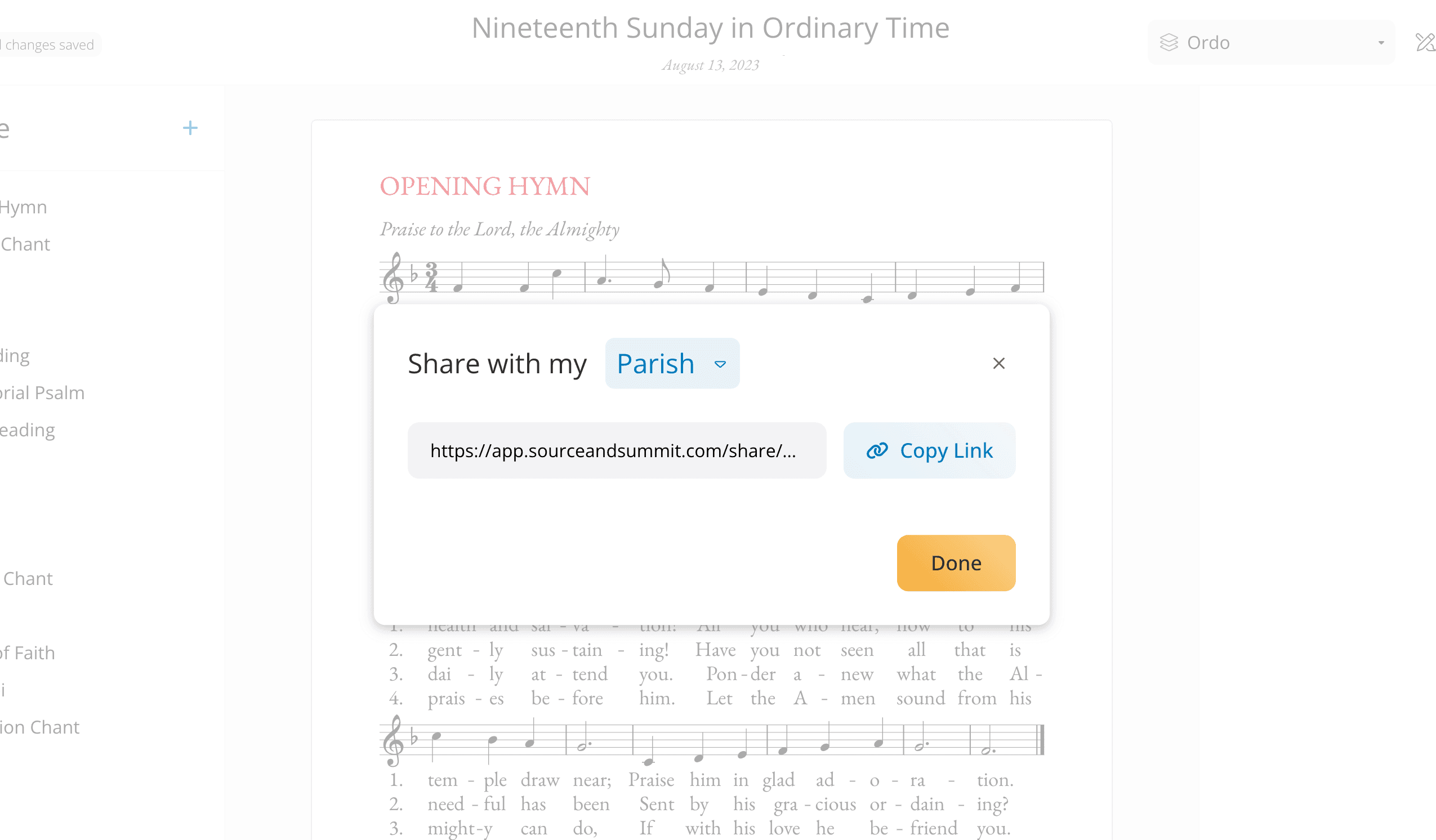
Share with your congregation
You can then copy a custom link to your Ordo and share it in any way that you like: In an email, Flocknote, on your website, or even in a custom QR code that parishioners can scan to view the music and readings for the day.
Shared Ordos for your congregation are optimized for visual clarity and excellent performance, ensuring a superior experience for your parishioners.
Uploading Audio for Your Team
When you upload music from outside Source & Summit’s native library into the Digital Platform, you can give it audio of its own, so your uploaded music can help prepare your singers just as well as our native ones do.
When you upload a musical score, you can attach a recording in whatever form you already have it in:
Upload an audio file in MP3 or M4A format
Upload a MIDI file to generate a practice track
Link to a recording you keep elsewhere, including Dropbox or at any direct web address
You can also link out to popular streaming services (Apple Music, Spotify, or YouTube). These links will not play in-platform, but will open the track in the associated app.
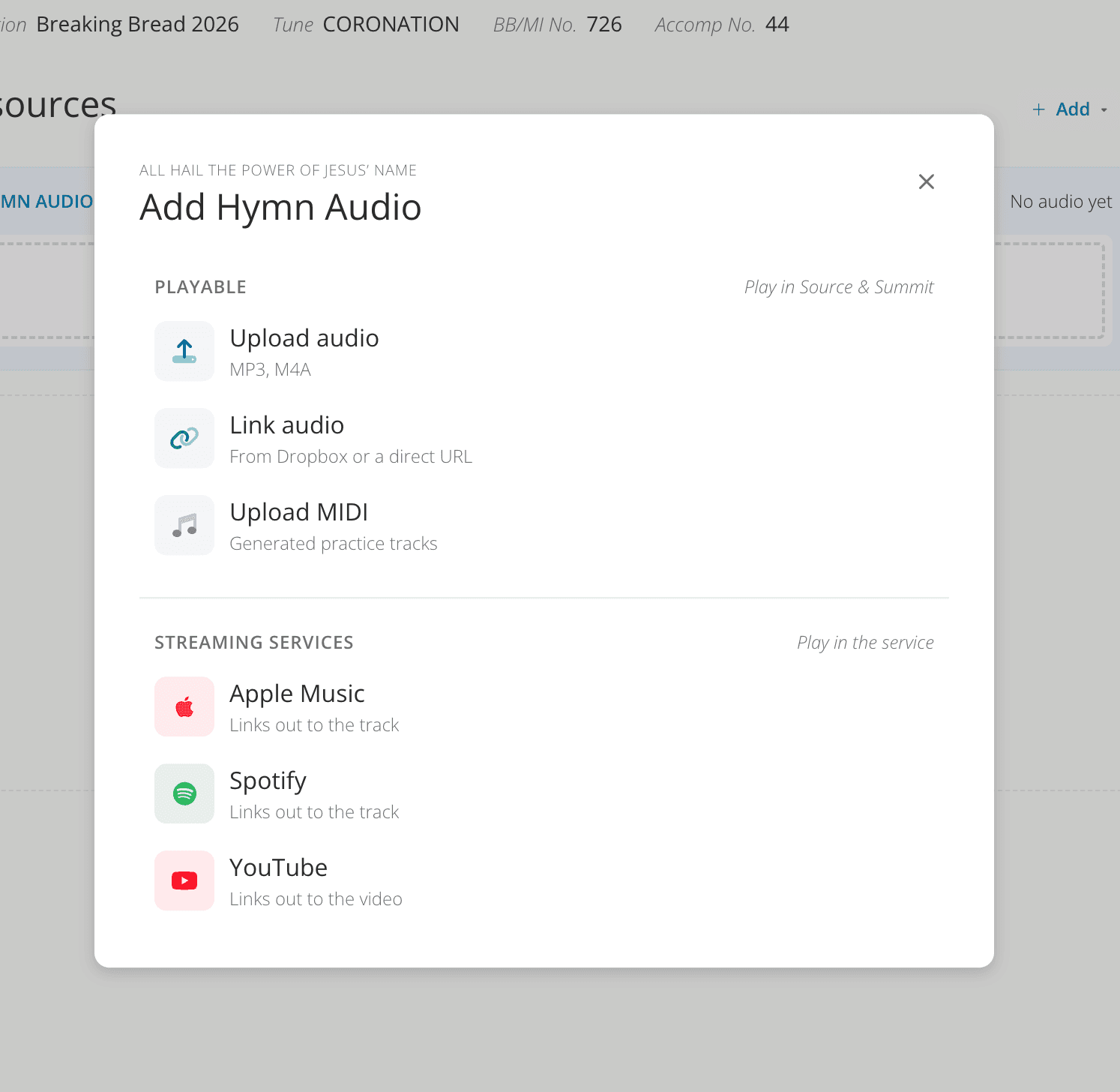
Add Your Own Audio to Specific, Uploaded Music
If you have multiple resources associated with a particular piece, the first one you upload will become the default for every associated resource; however, you can override this and upload (or link to) separate audio files for any individual scores you may have uploaded also, such as descants, accompaniments, choral arrangements, etc. Each musician then hears exactly what they need, right from the same shared Ordo — no separate files, no extra emails.
One thing to keep in mind: Audio Upload applies to the music resources you are uploading, or have already uploaded. Music in the Source & Summit library has its own recorded audio, which stays in place and needs nothing added.
In Conclusion
Coordinating a parish music program will always take care and attention, but it no longer requires the manual, weekly grind that most coordinators have simply come to accept.
With the Source & Summit Digital Platform, you can share everything your team needs for particular liturgies and keep an active and easy-to-maintain list of musicians and volunteers, all in the same digital hub where you prepare your liturgies. No more need for separate message threads, copy-and-pasting email addresses, Dropbox coordination, broken links, or last minute phone calls.
What that really means is that you get the time back that you need to do what drew you to this ministry in the first place. Instead of chasing down details, you can spend your energy building and training your choir, deepening your parish's sung prayer, and executing beautiful liturgies week after week.
Summer is the ideal season to put a better system in place, before the rhythm of the fall sets back in. If you've been carrying the weight of coordination entirely on your own, there's a lighter way to work — and now is a good time to try it. Start a free trial of the Source & Summit Digital Platform, and discover how much of your time you can gain back to do what you do best.